
TL;DR
On October 6, 2026, I got REA (“Reverse Engineer Anything”) running headless Ghidra 12.1.4 on my Debian 13 desktop and used it to analyze my first Linux binary. It took one installer, three Java versions, one verified 543 MB download, and a six-line shell function.
The tool works, but the real value was the path to get there. Almost every snag taught me something I’m also studying for the AWS DVA-C02 exam or working through in Black Hat Python. This Lab Journal walks through what I did, why each step mattered, and where those connections showed up.
What REA is, and why I tried it
REA is an open-source (MIT-licensed) command-line tool and MCP server, published on npm as rea-agents and on GitHub as morluto/rea. It gives you, or an AI coding agent, one consistent set of commands for investigating software, from “what does this app do?” down to decompiled functions.
REA doesn’t do the heavy analysis itself. It’s a coordinator: it drives real reverse-engineering engines behind the scenes, mainly Ghidra (the NSA’s free disassembler and decompiler) and Hopper (a commercial Mac/Linux disassembler). You ask REA a question; it picks an engine, runs it, and hands back a structured report.
I wanted it for two reasons:
- Learning. Reverse engineering has a steep start. You have to pick a tool, learn its interface, and decide what to look at next. REA standardizes that first layer.
- Agents. REA can plug into Claude Code, Cursor, VS Code and others. I deliberately chose none during setup. I wanted to understand the tool by hand before letting an agent drive it.
How the pieces fit together
When I type one rea command, it passes through four layers before Ghidra ever touches the file. Each layer was a separate thing I had to get right.
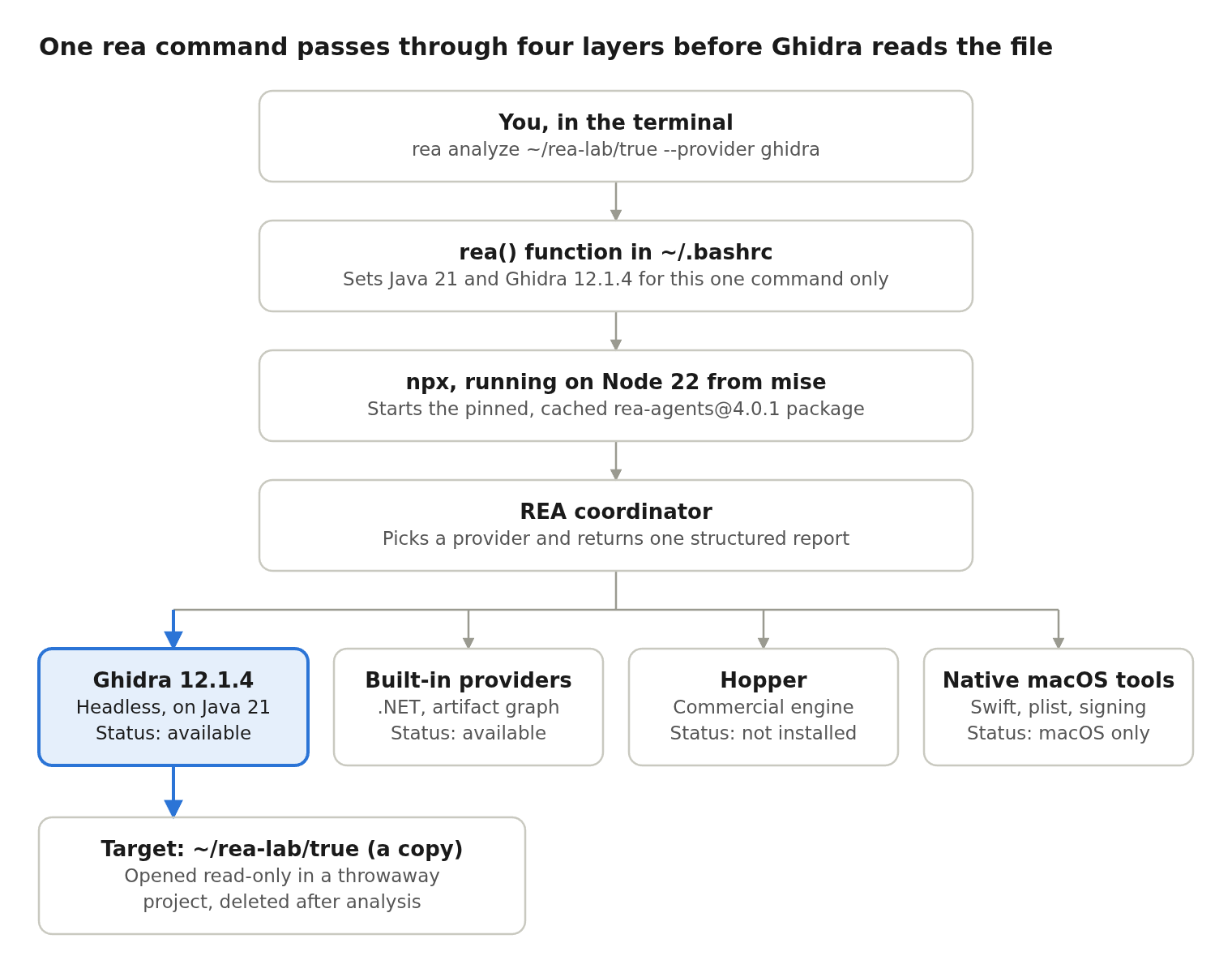
Figure: One rea command passes through four layers before Ghidra reads the file.
The highlighted path is the one my first analysis took. Ghidra and REA’s built-in providers work on Debian; Hopper isn’t installed, and the macOS tools can’t run on Linux at all. The report travels back up the same chain to my terminal.
Step by step: what I actually did
Each step below is a command I ran, followed by why it mattered.
- Ran the installer:
npx rea-agents setupnpxdownloads an npm package temporarily and runs it without a permanent install. npm asked permission first, then REA asked again before changing anything, with “No” as the default.- I installed only the guided REA skill (instructions an agent can read) and connected no agents.
- Checked my Node.js:
node --version→v22.23.2- REA needs Node 22 or newer.
which nodeshowed it comes from mise, a version manager that uses small “shim” programs to routenodeto the right version. My(base)prompt is conda, but conda wasn’t supplying Node.
- Asked REA what works here:
npx rea-agents capabilities- Every macOS-only feature reported
unsupported_host. The Ghidra engine reported two problems: noGHIDRA_INSTALL_DIRset, and an unsupported Java.
- Every macOS-only feature reported
- Found my existing Ghidra installs:
find ~ /opt /usr/local /usr/share -maxdepth 3 -iname "*ghidra*" 2>/dev/null- I had two copies of Ghidra 12.1.2, one in
~/Downloadsand one in/opt/tools/ghidra.grep application.versionon each copy’sapplication.propertiesconfirmed the real version.
- I had two copies of Ghidra 12.1.2, one in
- Ran the health check with temporary settings:
GHIDRA_INSTALL_DIR=... JAVA_HOME=... npx rea-agents doctor- Putting
NAME=valuebefore a command sets it for that one command only. It’s a safe way to experiment. - Doctor said exactly what was wrong: Ghidra 12.1.2 was too old (REA wants 12.1.4) and my Java was wrong (more on that below).
- Putting
- Downloaded Ghidra 12.1.4 from the terminal
- Queried GitHub’s API with
curlto get the exact filename and its published SHA-256 digest. - Downloaded with
wget. - Verified with
sha256sum -c, which printedghidra_12.1.4_PUBLIC_20260921.zip: OK.
- Queried GitHub’s API with
- Extracted it next to the old copy:
unzip -q ... -d /opt/toolsls -ld /opt/toolsshowed I own the folder, so nosudowas needed. The old 12.1.2 stayed as a fallback.
- Made it permanent with a shell function in
~/.bashrc
# REA reverse-engineering CLI: uses Java 21 + Ghidra 12.1.4 only for REA
rea() {
  GHIDRA_INSTALL_DIR=/opt/tools/ghidra_12.1.4_PUBLIC \
  JAVA_HOME=/usr/lib/jvm/java-21-openjdk-amd64 \
  PATH=/usr/lib/jvm/java-21-openjdk-amd64/bin:$PATH \
  npx rea-agents@4.0.1 "$@"
}
The function applies Java 21 and Ghidra 12.1.4 only while REA runs. My system default Java stayed on Corretto 26, which java -version confirmed afterward. Pinning @4.0.1 means a future REA release can’t silently demand a newer Ghidra and break my setup.
The final rea doctor showed every Ghidra check healthy and available: true for the first time.
The Java detour: 26, then 25, then 21
REA accepts exactly one Java major version for Ghidra: 21. Getting there took three tries.
| Attempt | Java | Why I tried it | REA’s verdict |
|---|---|---|---|
| 1 | Amazon Corretto 26 | My system default | unsupported_version |
| 2 | Amazon Corretto 25 | Ghidra 12.1’s own docs list Java 25 | unsupported_version: “Update JAVA_HOME to the root of a 64-bit JDK 21 installation” |
| 3 | Debian OpenJDK 21 | What REA’s doctor asked for | healthy |
The lesson: a wrapper tool can be stricter than the tool it wraps. Ghidra itself runs on 21 or newer, but REA pins 21 because that’s what its developers test against. Attempt 2 was a reasonable guess based on Ghidra’s documentation, but the authoritative answer was in REA’s own error message all along. Read the remediation line first.
I didn’t uninstall anything. /usr/lib/jvm/ now holds Java 8, 21, 25 and 26 side by side, and that’s normal. Debian’s alternatives system decides the default, and the rea function overrides it for REA alone.
First analysis: what’s inside /usr/bin/true
My first target was a copy of /usr/bin/true, a program whose only job is to exit successfully. Ghidra found 255 functions, 157 strings and 32 sections in it.
mkdir -p ~/rea-lab
cp /usr/bin/true ~/rea-lab/
rea analyze ~/rea-lab/true --provider ghidra --format md
I analyzed a copy in a lab folder, not the system file. REA reported import_mode: ephemeral-read-only, meaning Ghidra opened the file read-only in a throwaway project that was deleted afterward.
Why 255 functions in a program that “does nothing”? Debian’s true comes from GNU coreutils, so it still supports --help, --version and translations. It also carries startup and shutdown code the compiler adds to every program. Even trivial binaries are full of hidden machinery.
The sections worth knowing, since they appear in every Linux ELF binary:
| Section | Size in true | What it holds |
|---|---|---|
.text | 17,118 bytes | The machine code itself |
.rodata | 2,895 bytes | Read-only data, mostly text strings |
.dynsym / .dynstr | 1,464 / 791 bytes | Names of functions imported from shared libraries like libc |
.plt / .got | 720 / 416 bytes | The lookup table used to find those library functions at runtime |
.data | 128 bytes | Global variables with starting values |
.bss | 448 bytes | Global variables that start at zero |
The report also included the file’s SHA-256 (b381cc8c…). Running sha256sum ~/rea-lab/true and matching it proves the report belongs to the exact file I meant to analyze.
How this connects to Black Hat Python
Black Hat Python teaches offensive tooling by building it from scratch in Python. REA is the other side of that coin: understanding what compiled software actually does. Five concrete overlaps showed up in one afternoon.
| What I did with REA | Where it shows up in BHP | The shared skill |
|---|---|---|
Ran file to identify the binary as ELF from its header bytes | Decoding raw IP/ICMP packet headers with struct and ctypes | Formats are identified by known bytes at known offsets, not by names |
Read .plt / .got in the section table | Monitoring and intercepting what processes do | Hooking often works by changing what a program’s lookup table points to |
Read drwxr-xr-x on /opt/tools | Hunting privilege-escalation paths on a target | A world-writable tools folder (rwxrwxrwx) would be a red flag |
| Ran Ghidra headless instead of the GUI | Automating every attack step in a script | Security work scales when tools run without a human clicking |
| Analyzed a copy, in a read-only throwaway project | Working inside a lab, never on live systems | Isolation first, before anything gets interesting |
The biggest connection is mindset. BHP keeps asking “how would I build this?” Reverse engineering asks “how did someone else build this?” You need both to understand malware, and both to write tools that hold up.
How this connects to AWS DVA-C02
None of this touched AWS directly, yet five exam topics showed up in the terminal output.
| What happened on my desktop | The DVA-C02 concept |
|---|---|
GitHub’s download answered 302 Found and redirected to a long URL with se= (expiry) and sig= (signature) | S3 presigned URLs: temporary, signed access to a private object without making the bucket public |
I queried api.github.com with curl and got JSON back | AWS service APIs: every AWS service is a REST API, and the AWS CLI and SDKs are signed API calls underneath |
sha256sum -c confirmed the download byte for byte | Integrity checks: S3 can verify uploads with checksums so the stored object matches what was sent |
| Amazon Corretto showed up as one of my JDKs | Lambda Java runtimes are built on Amazon Corretto |
The rea function scoped environment variables to one command | Lambda environment variables: configuration injected per function, not globally |
The presigned URL was the clearest. If an exam question asks how to give users temporary download access to a private S3 object, I’ve now seen the answer pattern working, not just read about it.
Lessons learned and security habits
- Read the tool’s own error message first. REA’s doctor named the exact Java and Ghidra versions it wanted. Outside documentation was a reasonable guess; the remediation line was the answer.
- Verify every download.
curlthe API for the published digest, thensha256sum -c. It costs ten seconds and proves nothing was swapped in transit. - Scope configuration as narrowly as possible. A global
export JAVA_HOMEwould have switched every Java program on my machine. A shell function changed only REA. It’s the same least-privilege thinking as IAM, applied to environment variables. - Pin versions of tools that pin their dependencies. REA demands an exact Ghidra build, so I pinned REA itself to
@4.0.1. I’ll upgrade both together, on purpose. - Don’t paste several commands when one might ask a question.
npxasked for approval, and the next pasted line got swallowed as the answer. One command at a time when a prompt is possible. - “Unsupported” isn’t “broken,” but it is a risk. REA officially supports Ubuntu 24.04+, not Debian 13. It works here, but if something breaks, I’m off the tested path.
- Never analyze unknown binaries on your daily machine.
/usr/bin/truewas safe. Anything from the wild goes into an isolated VM in my cyber range.
What’s next
The overview gave counts; next I’ll look inside. That means listing the 157 strings in true and decompiling its main function into C-like pseudocode with REA’s Ghidra-backed commands.
- Run
rea --helpto map REA’s 69 CLI commands - List and search strings in
~/rea-lab/true - Decompile
mainand compare it with the coreutils source - Stand up an Ubuntu 24.04 VM in the cyber range (REA’s supported host) for anything untrusted
- Clean up the two old Ghidra 12.1.2 copies and the 543 MB zip
- Decide whether to connect REA to an agent, now that I understand it by hand